[0] Taking notes in Obsidian without being in Obsidian: a project overview
I send a message to a WhatsApp chat and it becomes a formatted note in my Obsidian, with a commit straight to GitHub. Everything on a VPS for ~5 USD a month. Here's how it works inside.
This is my first blog post outside Substack; you probably noticed from the title, or maybe not, who knows, might be a vibe coder reading this. The [0] means we're at element zero of our "array of articles" about this project (and if you really haven't caught on yet, time to learn the basics, my friend): it's going to be a series, and more are on the way. I'm building all of it live, so you can follow the whole process on the full YouTube playlist.
I built a system to solve a very specific pain point in my day-to-day: send a message to a WhatsApp chat and have it become a formatted note in my Obsidian, automatically, without needing to open the computer. It runs on a VPS for ~5 USD a month.
This post is about how it works inside, why each decision was made, and what's still missing.
The problem
I use Obsidian as my notebook, with the entire vault versioned on GitHub. That gives me something important: cloning the repo on any machine, I have my second brain right there. No proprietary app holding my data, no third-party sync, just git.
I organize everything with the PARA method (Projects, Areas, Resources, Archives, described by Tiago Forte at fortelabs.com/blog/para). Rough summary: everything that enters the system lands in an inbox/ folder before being dispatched to one of the four definitive places. For me, the inbox/ has two subfolders that matter a lot:
inbox/CONSUMO: notes about external stuff I want to study (articles, podcasts, videos, books, talks, recommendations).inbox/IDEIAS: my own thoughts, insights, project sketches.
As a developer who also creates content on the side, keeping references of what I consume is part of my flow. When I'm about to write or record something, I go back to those notes to pull context, quotes, links.
The old ritual was this:
- Read or hear something interesting.
- Open Claude Code inside my vault.
- Ask it to assemble the note in my standard format (frontmatter, tags, structure).
- Save it in Obsidian.
It works, but there's a problem: 80% of the time I'm not at the computer when I consume the content. I'm walking and listening to a podcast, reading on my phone, or reading a book. By the time I got home, I'd already forgotten half of it.
Then I thought: what if I could just send a message on WhatsApp (or any app that has integration with my WhatsApp) and have it become a note?
The solution
The usage flow turned out like this: I send one or several messages to a WhatsApp chat with myself. When I finish the thought, I close it with a keyword (ok, salva, fim, vai).
The AI classifies whether the message is a consumption note or an idea, picks the right template, generates the note in my standard format, and the commit shows up on GitHub. I didn't have to open the computer.
A few UX decisions that mattered:
- No prefix: the first version required typing
cooridebefore each message to tell the type. It was unnecessary friction, so today the AI classifies by looking at the content itself. - Group messages into a block: you send "I'm reading this article by akita", then "I found part X interesting", then "I disagree with Y", then
ok. The four messages become a single note, not four separate notes in the vault.
The system design
In the order of what happens when a message arrives:
- Evolution API (a self-hosted WhatsApp client based on Baileys) delivers a webhook to my Fastify API when a message arrives in the chat.
- Each message goes into a buffer in Redis. Several consecutive messages become a single "block" identified by chatId.
- When a terminator arrives (
ok,salva,fim,vai), or when 30 minutes pass without a new message (via a sweeper that runs every minute), the block closes. - The API calls Gemini just to classify the block as
consumoorideia. The response is strict JSON like{ "kind": "consumo" }. - With the classification in hand, the API picks the right prompt (one for consumption, another for ideas) and calls Gemini again, now to generate the full note as structured JSON:
{ title, body }. - Octokit commits the
bodyas a.mdfile straight to the vault's repo on GitHub, in the right folder (inbox/CONSUMOorinbox/IDEIAS). - The API replies in the chat with
✅ Note created: <path>.
The important point about steps 4 and 5: they're two separate calls to Gemini. It's not the same model doing everything in one shot. The classifier runs on the original block text; only after that does my API decide which prompt to use and trigger the second call. This isolates responsibilities: the classifier is a small, cheap job, and the generator receives a system prompt tuned for the type of note it will produce.
Why the buffer exists
Without it, each loose message would become an orphan note. With it, I can think out loud in the chat: send the link, then a comment, then fix the comment, then add a reference, and close with ok. All of that gets concatenated and sent to Gemini in one go.
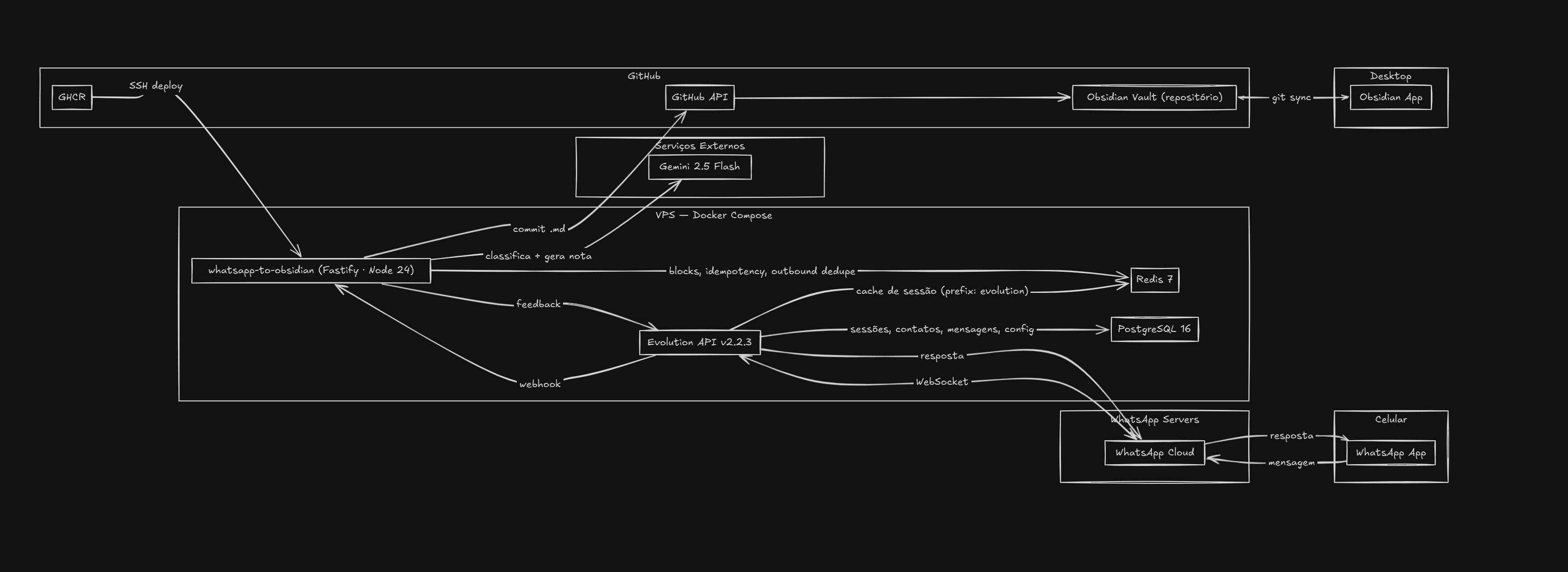
Stack
One line per component:
- Runtime: Node.js 24 (ESM, strict TypeScript).
- API: Fastify + zod for payload validation.
- Redis: ioredis. Handles the block buffer, per-message idempotency, per-block idempotency, outbound dedupe.
- AI: Google Gemini via the AI Studio API. Same model for the classifier and the generator, different prompts.
- GitHub: Octokit, committing straight through the API (no local clone).
- Logger: structured pino, with secret redaction.
- Tests: vitest, focused on core units (parser, terminator, slugify, blockManager, processBlock).
- WhatsApp client: Evolution API self-hosted (needs Postgres for its own state and Redis for cache; I reuse the same Redis as my application).
- Lint/format/hooks: Biome, Lefthook and commitlint, with Conventional Commits validated on commit.
Where it runs
Everything in a single docker-compose on a cheap Hetzner VPS, costing ~5 USD a month. The services running are:
whatsapp-to-obsidian: my API.evolution-api: WhatsApp client.redis: shared between Evolution and my API (separate databases via key prefix).postgres: used only by Evolution API.
Deploy pipeline: a push to master triggers a GitHub Actions workflow that runs lint, typecheck, tests, builds the Docker image, publishes it to ghcr.io, SSHs into the VPS and runs docker compose pull && up -d. The webhook is protected by a random token in the path and by Docker network isolation (the API isn't exposed externally; only Evolution talks to it through the compose's internal network). Dependabot takes care of updating npm, GitHub Actions and Docker images.
Roadmap
- Audio support.
- URL enrichment via Jina Reader.
- Automatic transcription of YouTube videos.
- Image support (OCR).
- Improve the quality of generated notes.
Closing
The reflection that stays with me is something I've heard many times but only now truly lived: the most useful projects for yourself are the small ones, focused on a pain of yours, that you use every day. This one is the first useful version; it'll keep evolving as I use it and discover its limits.
If you also use Obsidian, or have this same pain of capturing things away from the computer, tell me how you solved it. I'm curious to see other approaches.
Enjoyed this post?
Subscribe on Substack to receive new posts directly in your inbox.
Subscribe on Substack